
News
Turn presentations into complete videos
Google Vids lets you import presentations and work with them as video.
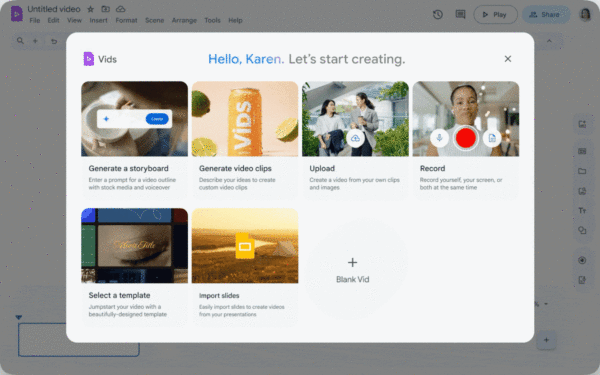
Google Vids now supports importing Google Slides presentations directly and turning them into videos, with Gemini handling the script, voiceover, transitions and animations.
It is not an export of slides in video format with an audio track on top, but a complete video in which Gemini interprets each slide's content, generates a narrative script and produces an editable video with sequencing, pace and narration.
Before generating the video, you can review and edit the script slide by slide, or use the original speaker notes as a starting point.
The text is finalised before the voiceover is created, avoiding unnecessary iterations.
In practice, you can have a virtual presenter narrating the content, without filming, lighting or post-production.
The feature is included in Google Workspace Business and Enterprise plans and does not require an add-on or an additional subscription.
If you already use Google Workspace, you already have access.
Possible use cases are varied, including internal training videos, product walkthroughs, onboarding and customer updates.
If the deck already exists, the video is generated in minutes.
Open Google Slides, import it into Vids, adjust the script and you have a finished video.
Give it a try.